
TLDR
If you’re running Pi-hole on your network for ad blocking and privacy, you’ve probably wished you could toggle it on and off without digging through a browser tab. The Pi-hole Controller Stream Deck plugin puts that control, and a lot more, right on your physical deck.
See more here: Pi-hole Controller on Elgato Marketplace.
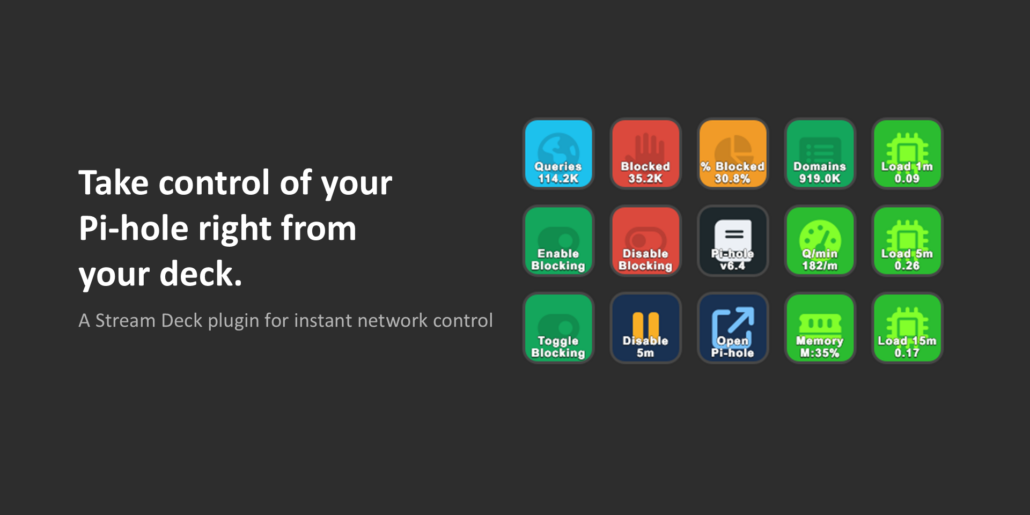
What It Does
Pi-hole Controller is a Stream Deck plugin with seven actions:
- Enable Blocking – re-enable Pi-hole with a single button press
- Disable Blocking – pause blocking instantly
- Disable for X – pause blocking for a configurable duration (30 seconds, 1 minute, 5 minutes, or custom), with a live
countdown shown directly on the button - Pi-hole Stats – display any of 11 metrics on a button: total queries, blocked queries, percent blocked, domains on
block lists, queries per minute, CPU load, memory usage, client count, and more - Pi-hole Status – a green/red indicator showing whether blocking is active, with an optional secondary metric
- Pi-hole Version – shows your installed version and highlights when an update is available
- Open Pi-hole UI – launches the admin interface in your browser with one press
Pi-hole v6 Support
Pi-hole v6 introduced a new app password authentication model, replacing the old static API key. This plugin is built specifically for that – it handles session-based auth automatically, reuses sessions across restarts to avoid creating unnecessary sessions on your Pi-hole, and cleanly re-authenticates if a session expires.
To get started, generate an app password in Pi-hole under Settings → Web Interface/API → Expert mode → App Password, then enter it once in the plugin’s configuration panel. All buttons share the same connection settings.
Setup
1. Install the plugin from the Elgato Marketplace
2. Drag any Pi-hole action onto your deck
3. In the configuration panel, enter your Pi-hole’s IP address and app password
4. Click Test Connection to verify, and you’re done
Notes
The plugin is built with the official Elgato TypeScript SDK and uses a shared polling architecture – all stat and status buttons update from a single poll cycle, so there’s no unnecessary load on your Pi-hole regardless of how many buttons you add.

